
1.4.12 Text spacing
Users might change how text is shown in their browser, so it’s important that this doesn’t break the contents or functionality of the service. It’s ok if everything doesn’t look at its best, but no content should be hidden or stop working.
This is especially important for users who have issues with reading text, such as those with dyslexia.
Mostly this was fine in our test, but we found problems in a couple of the apps.
When addressing this issue you can test it by using a text spacing bookmarklet for accessibility testing. There are several that work very well.
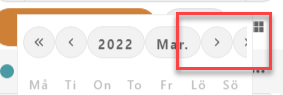
Kalender app
One of the buttons for changing what dates are shown in the calendar view is cut off vertically. It’s still possible to use, but it makes it harder to understand its function.
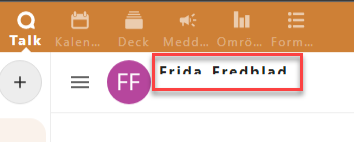
Talk app
Only half the name of the person you’re talking with is shown, it’s cut off horizontally. If you’re unsure you could ask the person for their name, but this really should just work.
- Make sure every part of the interface and all contents are shown when text spacing is activated.