3.3.3 Error suggestion
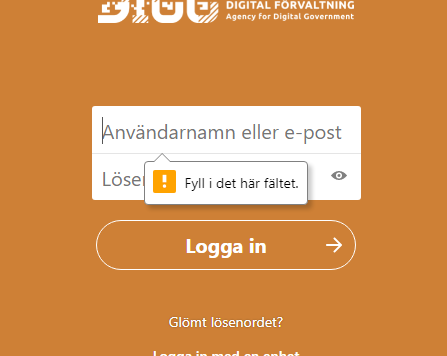
There are issues with the error message in the login form. In the screenshot below the automatically generated error message from the required-attribute is shown, which does not fail the WCAG-standard since it’s generated by the browser.
But there are still issues with it, it says that a field needs to be filled in but gives no guidance on how the user should fill it in.
But another issue does fail this success criterion, and that is the error message shown when the user has made a mistake in filling in the password or username fields. The message shown simply tells the user that there’s something wrong in these fields, with no information on which field the error is in or how to resolve it.
To make this more usable for the user make sure each field has its own separate error message, and give the user information on how to fix any problems. So for instance, if you notice that the user has entered an incorrectly formatted e-mail let the user know that.
Formulär app
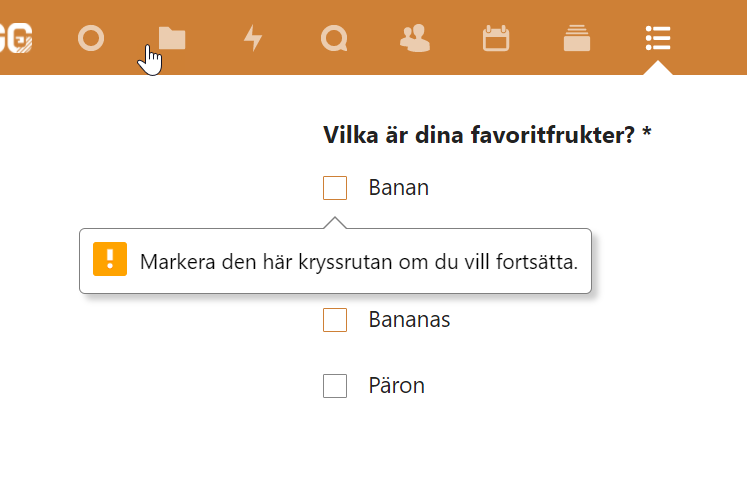
Using the required-attribute to generate error messages means that they might at times be misleading. In the example below the user need to choose one of the four checkboxes, but the error message simply says that the user must check the first one to continue. Since only the first object with this attribute gets an error message this can be quite confusing.
- Design and implement custom error messages. They should tell what the issue is and how to resolve it where possible
- They must be connected to their form objects in the code
- Avoid using the required-attribute